In a construction project there are different types of costs, depending on the scope, type and scale of the project. Examples of the types of costs that must be dealt with include direct, indirect, fixed, variable, capital, maintenance, financing, design, environmental costs, fees and others.
To monitor and forecast the costs associated with a given project, costs can be divided into 3 groups:
- Direct costs: expenses directly attributable to the construction of the project. They include materials, labour and equipment specific to execution of the works. These expenses depend on the construction volume and are independent of the duration.
- Indirect costs: expenses required to carry out the project but not directly linked to a specific project component. They include administrative expenses, safety, office rental, auxiliary equipment, personnel transport and indirect labour, among others. These expenses are independent of the construction volume but dependent on duration. The range of 5% to 20% of total cost is offered here as an indicative reference from the author. Its application must be adjusted to the project type and conditions and the company’s cost structure.
- Fixed costs: costs that remain constant regardless of the project volume or duration. Examples include taxes or administrative fees, as well as specific equipment or machinery not included in direct costs.
In addition to these costs, overheads can be distinguished, although they are sometimes considered indirect costs. Overheads represent expenses associated with the company's operational functioning during the works and cannot be directly assigned to that project. Examples include head-office expenses, marketing and representation expenses, directors' costs and software licences, among others. The range of 1% to 5% of the total project budget is offered here as an indicative reference from the author. The applicable percentage depends on the project, the company’s structure and its approach to allocating overheads.
Therefore, direct costs are those chargeable to the work item, while indirect costs are those required to keep the project or company operating.
Cost estimation takes place during the tender phase in order to prepare the project offer. To estimate direct costs, the level 3 project schedule can be used by loading the man-hours, materials and equipment required to complete each activity. This schedule is also usually required in the tender specifications when submitting an offer.
The calculation of indirect costs may vary depending on the nature and complexity of the project. The most accurate method is to add each item that makes up the indirect costs. However, this can be extremely complex, so it is common to apply a percentage to direct costs. The percentage to be applied varies depending on the sector and the company.
Once all planned costs have been calculated and divided into one of the 3 previous categories, they can be added to the detailed schedule. Direct costs should be included as material, equipment and labour resources for each schedule activity. These resources will have an associated unit or hourly cost so that, once assigned, the total direct cost can be calculated.
Indirect costs are related to the period over which the project is developed, so the cost per time unit can be calculated. To make indirect costs vary according to the finish date, a resource can be assigned to a WBS Summary activity with Duration Type = Fixed Duration and Units/Time. Depending on how many indirect resources and activities are created, very detailed control of the project's indirect cost can be achieved.
In addition to resources, Primavera P6 allows different fixed expenses to be created for each activity. All fixed costs should be loaded through the Expenses tab, entering as much information as possible. In some cases, instead of resources, this option can be used to control all costs in a simplified way.
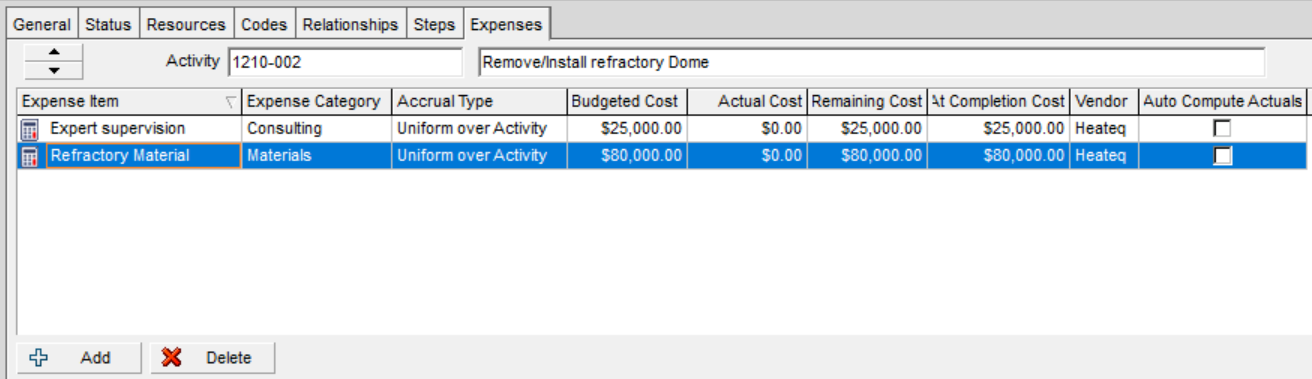
For costs to be accounted for automatically, the Auto Compute Actuals option must be activated auto compute actuals vs update progress
Example of indirect costs in Primavera P6
Assume a project whose indirect costs have been divided into:
IC1. Indirect resources: average daily cost of each indirect resource.
IC2. Offices: office rental, electricity and office consumables cost.
IC3. Aux equipment: rental and fuel cost of portable lighting towers and site vehicle.
The project is planned to be completed in 44 days, with a cost of 1,200 dollars per day in auxiliary equipment, 400 dollars in offices and 25 people of indirect labour (160 dollars per day). The total planned indirect costs are 246,400 dollars. These indirect costs must be assigned to a WBS Summary activity so that, if the project is extended, the activity duration and therefore the costs (units) also increase.

After 12 days, different delays have arisen that have caused the project to be delayed by 29 days. Thirty indirect personnel have been incorporated instead of the 25 originally planned, and the office cost is 30 dollars per day higher than planned.

Once the changes have been made in the schedule, the dates (F9) and costs (Tools > Recalculate Assignment Costs) must be recalculated. The total planned indirect costs are now 459,390 dollars. Hours can be used as the time unit, but care must be taken with the assigned calendar.
Earned value in Primavera P6
Earned Value Analysis (EVA) is a technique that allows project progress to be measured against what was planned and budgeted. It consists of comparing the completed work (earned value) with the planned work (planned value) and the cost incurred (actual cost). It provides simple indicators that help determine whether the project is on time and within budget.
To calculate earned value with Primavera P6, the following steps must be followed: how to calculate earned value in primavera p6
- Load costs into the project baseline using resources that do not automatically calculate actual values (Auto Compute Actuals).
- Assign the baseline for earned value calculation.
- Check that all activities have Physical as the progress type.
- Define the settings for earned value calculation under Admin > Admin Preferences > Earned Value.
- Progress the activities and costs and recalculate the project.
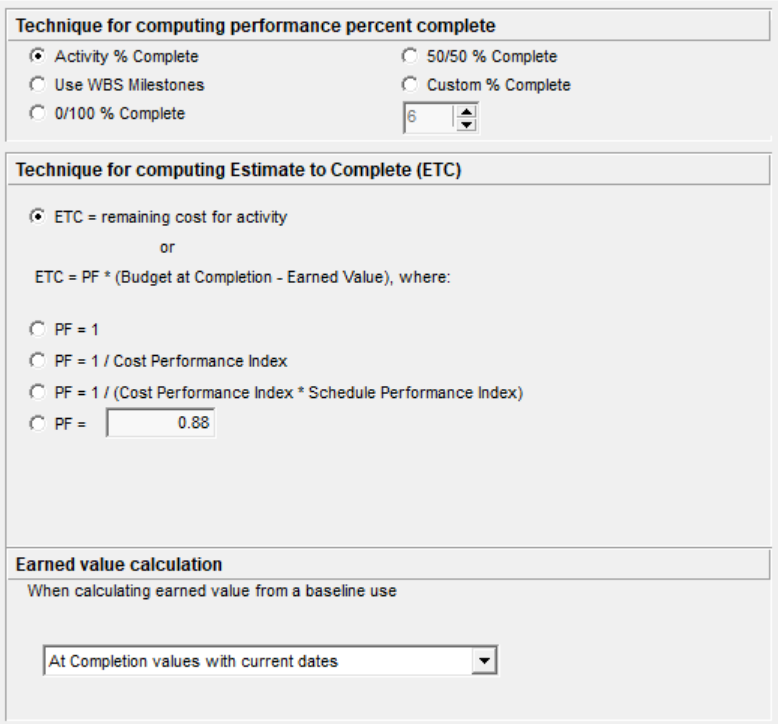
Primavera P6 is not only a project planning tool; it also allows project portfolio management. Earned value data from all projects can be viewed and analysed from the projects menu by activating the specific columns for the indices to be evaluated.

Project budget and expense control
Project budget and expense control is normally the responsibility of the project manager together with the cost control team. For precise and detailed cost control, there are various dedicated software tools. However, it can be very useful for the project management team or area managers to use the options offered by Primavera P6 to perform simple control and obtain an overall view of one or several projects.
Despite being extremely easy to use, this option is one of the least used. It is uncommon to find a project manager with knowledge of, or initiative to learn, Primavera P6, because of its reputation as complicated and unintuitive software.
It should be noted that the Primavera P6 budget and expense control tool uses a tiered approach. In other words, a total budget or expense at the upper node must be distributed to the corresponding lower nodes. This applies from the highest EPS level to the lowest WBS level of each project.
In the planning stage, the project manager and responsible parties must estimate the budget for each scope (WBS), project or area (EPS). Primavera P6 allows budgets primavera p6 tutorial chapter 25 budgets.html to be established and monitored in a simple way for each work breakdown structure (WBS), for each project and for each enterprise project structure (EPS).
The Spending Plan is especially useful when simple monitoring of actual costs against the assigned budget is required. Spending plan dates start 3 months before the start and end 4 years later. The following fields are used for the spending plan:
- Spending Plan. User-entered field representing the budget assigned to the EPS/Project/WBS.
- Spending Plan Tally. Accumulated field from lower or child nodes.
- Undistributed Current Variance. Field that shows whether the budget has been distributed to the child nodes (WBS/EPS) or not (Spending Plan minus Spending Plan Tally).
- Benefits. The Benefit Plan, Benefit Plan Tally and Benefit Variance follow the same logic as the Spending Plan, Spending Plan Tally and Undistributed Current Variance.
Example
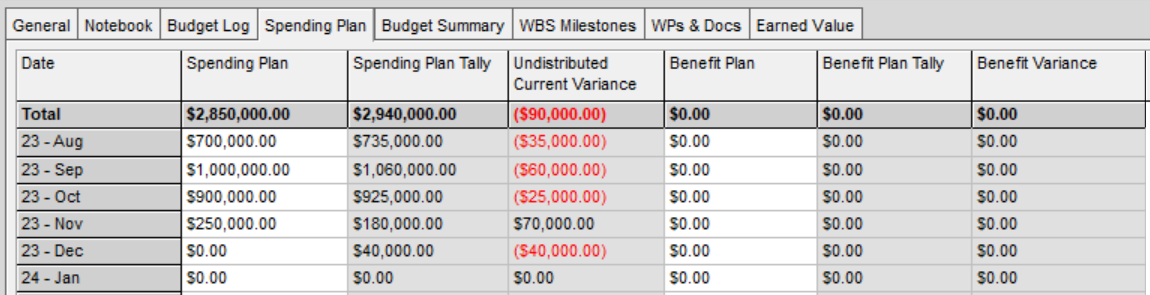
For this example, the original budget is the total contract value including indirect costs and profit. The spending plan is the planned cost for each month. The Spending Plan Tally represents the actual expenditure for each month. Therefore, the Undistributed Current Variance represents the difference between planned and actual.
The concept of the entered values may vary depending on the objective or working method. For example, the original budget does not necessarily have to include profit, or the spending plan may be updated with actual expenditure once the data has been obtained.
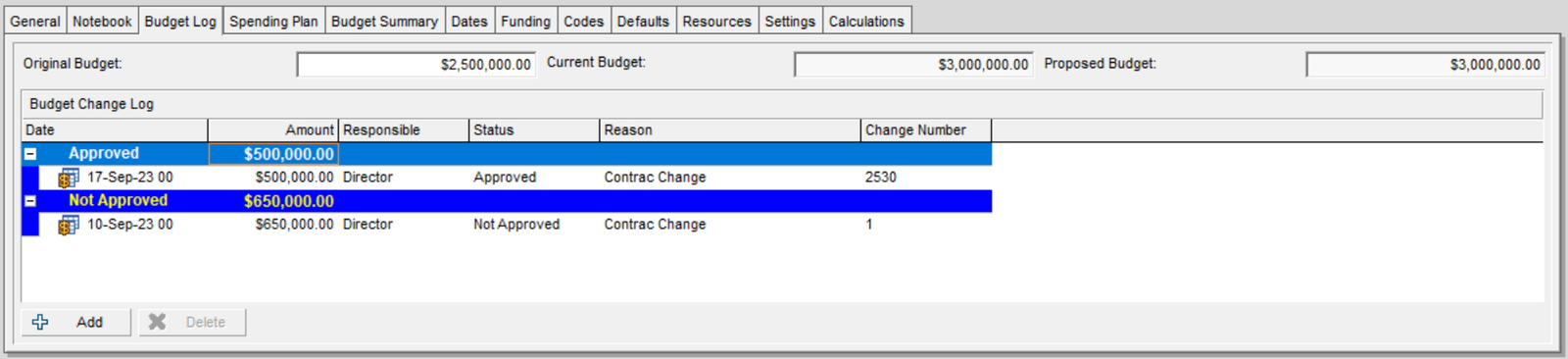
1. Budget Log
Given an original budget of 2.5 million for a specific project, where on 17 September a contract addendum was approved that increased the scope, duration and budget by 500,000 dollars, giving a total of 3 million dollars. The same would apply for an EPS, project or WBS.
2. Spending Plan
The works began in August, with a total planned expenditure of 2.85 million distributed across the 4 months that the project is planned to last. In the lower nodes, in this case in the project WBS, the actual expenses for each month have been added. Therefore, the Spending Plan Tally shows the accumulated value of all expenses from all first-level WBS elements. Finally, the Undistributed Current Variance column shows the difference between both values, with negative values shown in red.
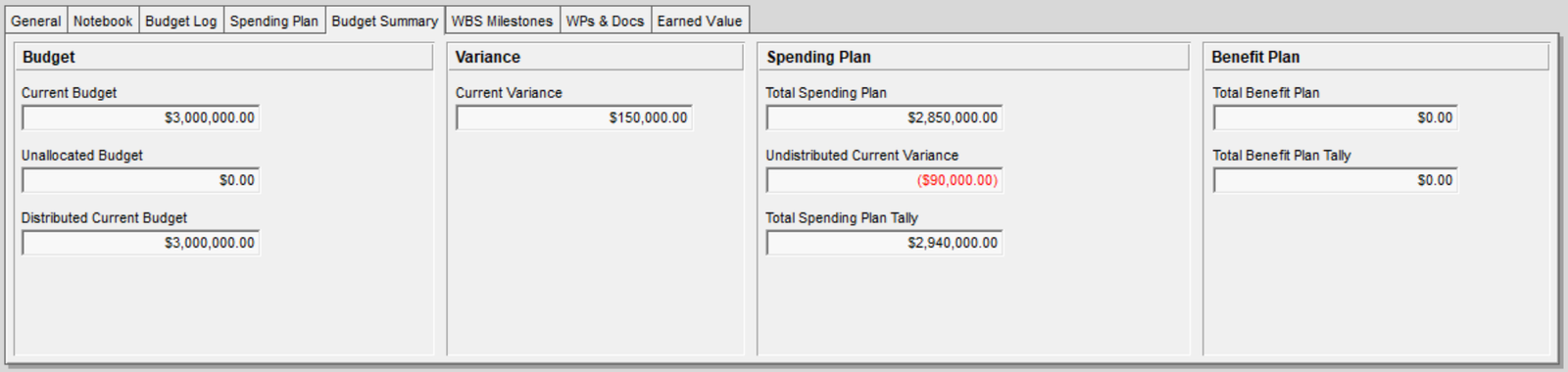
3. Budget Summary
This tab shows a summary of all the previously entered data. The first section contains the project budget and how much has been distributed to the lower nodes. The second section shows the difference between the Spending Plan and the budget. Finally, it shows the accumulated spending plan and the distributed and undistributed part of the lower node. In this example, negative 90,000 dollars would remain undistributed, which, according to the previous definition of concepts, represents an increase in actual expenses compared with the plan.